[Grafana] default Time Range 설정 변경

  [이슈] 대시보드 시작시 default time range가 최근 5분으로 자동 설정되어 로드 되면서 총 데이터 구간이 최근 50초인 Time series 타입의 그래프가 제대로 그려지지 않는 문제 [해결] 해당 대시보드의 설정(톱니바퀴)으로 이동 "<>JSON Model" 설정으로 이동 json 데이터 중 아래 부분으로 이동 하여 from 값을 원하는 값으로 변경 "time": { "from": "now-50s", "to": "now" }

기존 Vue.js 프로젝트 GitHub 연동 및 GitHub Page 연동

이미지
  1.  프로젝트를 GitHub repository에 연동 1) GitHub Desktop 설치 https://desktop.github.com/ 2)GitHub Desktop 실행 > File > Add local repository 프로젝트 폴더를 새로 생성한 repository 의 대상 디렉토리로 지정 Git repository로 지정된 폴더가 아니라면 아래와 같은 화면에서 "create a repository" 선택 publish repository 실행 3) vue.config.js 생성 및 프로젝트 build module.exports = { ..., publicPath: "/[GitHub에 등록할 Repository명]/", //일반적으로 프로젝트명과 동일하게 outputDir: "./docs", // 프로젝트를 build하면 docs 라는 폴더에 빌드된 파일이 생성됨 }; [프로젝트폴더]/docs 폴더에 빌드된 파일이 생성되었는지 확인 4) GitHub Desktop > Commit to main 및 push origin 실행 5) GitHub web page > Settings > Pages > Source 을 아래와 같이 설정 > Save

Grafana Ubuntu server에 설치

  Ubuntu and Debian(64 Bit) SHA256: b89ec6c0838f7ec4d8a61554cb7582f49690a0c560d607b7c652c4cf0d510ffa sudo apt-get install -y adduser libfontconfig1 sudo wget https://dl.grafana.com/oss/release/grafana_8.0.5_amd64.deb   sudo dpkg -i grafana_8.0.5_amd64.deb

Grafana https 사설인증서 적용 후 wss 에러 발생

이미지
  @문제 https 적용 후 grafana 대시보드를 삽입한 자체 개발 페이지 접속 시 화면은 정상적으로 표시되나 F12 디버그 모드로 볼때 아래와 같은 에러 발생 서버에서 그래프 수정시 자체개발 페이지에서도 실시간 수정사항이 반영되지 않음. @해결방법 Grafana 자체에 서버에서 일어나는 변경사항에 대한 실시간 반영(push)를 위한 메시지 엔진이 돌아가고 있으며 front-end 와 websocket 으로 연동하고 있음 https://grafana.com/docs/grafana/latest/live/ Grafana Live overview Grafana Live is a real-time messaging engine introduced in Grafana v8.0. With Grafana Live, you can push event data to a frontend as soon as an event occurs. This could be notifications about dashboard changes, new frames for rendered data, and so on. Live features can help eliminate a page reload or polling in many places, it can stream Internet of things (IOT) sensors or any other real-time data to panels. Note: By  real-time , we indicate a soft real-time. Due to network latencies, garbage collection cycles, and so on, the delay of a delivered message can be up to several hundred milliseconds or higher. Concepts Grafana Live sends data to clients over persistent WebSocke...

JAVA logging logback 1.4.5 사용시 SLF4J: Failed to load class "org.slf4j.impl.StaticLoggerBinder". 에러

이미지
  Published by BONGSEON KIM on December 22nd, 2022 [환경] IDE : STS 4 APP : stand-alone JAVA application ( no Spring (boot)) build tool : maven logging lib : SLF4J + logback 1.4.5 [상황] java logging을 위해 slf4j + logback 1.4.5 라이브러리를 maven을 통해 설치 *  참고로 위와 같이 의존성 설정시 maven에서 추가로 필요한 logback-core-1.4.5.jar 와 slf4j-api.1.7.25.jar 파일을 자동 추가함. 코딩 후 application 실행 아래 메시지 나오면서 로그를 지정된 위치에 쓰기 실패 [원인분석] SLF4J: Failed to load class "org.slf4j.impl.StaticLoggerBinder". 메시지로 구글링 SLF4J 공홈에 아래와 같은 내용 찾음 ( https://www.slf4j.org/codes.html#StaticLoggerBinder ) 붉은색 박스 부분 해석: slf4j-api 버전 2.0.x 이상은 ServiceLoader 메커니즘을 사용합니다. slf4j-api 2.x를 대상으로 하는 logback 1.3 이상과 같은 백엔드는 org.slf4j.impl.StaticLoggerBinder와 함께 제공되지 않습니다. slf4j-api 2.0.x를 대상으로 하는 로깅 백엔드를 배치하는 경우 클래스 경로에 slf4j-api-2.x.jar가 필요합니다. 관련 FAQ 항목도 참조하십시오 이해한 바로는, logback 1.3 이상의 버전은 slf4j-api 2.0 버전을 대상으로 하며, slf4j-api 2.0 버전 이상은 org.slf4j.impl.StaticLoggerBinder를 포함하지 않는다. 결국 내가 사용한  logback 1.4.5 는 반드시 2.x 이상의 버전을 사용해야 한다는 말 ... 위에서 적은...

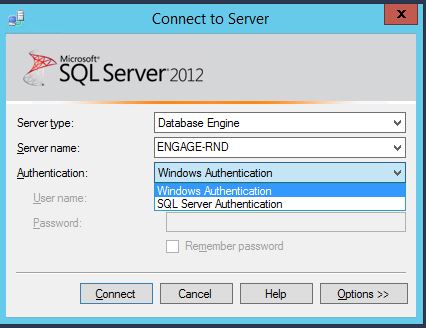
MSSQL 접속시 생성한 계정(SQL Server Authentication)으로 로그인 안되는 경우

이미지
MS SQL 에 내가 생성한 계정으로 로그인 하려고 하니 계속 실패하는 경우가 생겼다. 기존의 Windows 서버계정으로만 로그인 되고 추가 생성한 계정(SQL Server Authentication)으로는 안된다. 찾아보니 Server Properties 에 Windows Authentication  만 사용하게 할 것인지 두가지 모두 로그인 가능하게 할 것인지 선택하는 옵션이 있었다. 두가지 모두 로그인 가능하게 선택하면 끝~

IE(Internet Explorer) 10 에서 Session 을 잃어버리는 문제(Session Lost Problem)

1. 홈페이지를 제작하다가 로긴을 하니, 세션이 자꾸 사라진다. 2. 크롬에서 로긴하면 정상적으로 세션이 생성된다. 3. session 저장 폴더에 가서( linux, tmp ) 확인해 보니, 파일 생성은 정상적으로 한다. [현상] ie 를 제외한 브라우저에서는 세션이 정상적으로 등록되나, ie 에서는 세션 생성이 안된다. [원인] 구글링.. 키워드는 ie session problem [결과] Check the name of the server machine. IE has problems with machine names that contain '-' or '_' - they cannot maintain a session! I've had this problem twice in the past, and it always takes me weeks to figure out, and I'm shocked IE hasn't fixed it. [출처]  http://stackoverflow.com/questions/306132/php-session-problem-only-in-ie-really-strange-problem 도메인에 - _ 등이 이 있을 경우 ie 에서는 오류 나는 경우가 있다고 한다. 서브도메인에서 underbar(_) 가 있어서 세션이 정상적으로 등록되지 않았던 경우임. [출처] [PHP] ie 세션이 죽는 문제|작성자 키에르 http://blog.naver.com/vfxx/100158002869 [출처]   [PHP] ie 세션이 죽는 문제 | 작성자   키에르

linux netstat 에서 알려진 서비스 포트번호 표시

Linux 에서 Netstat 명령어 실행시 알려진 서비스의 포트번호는 서비스 이름으로 표시되고 안보이는데 보고자 할 경우 아래와같이 옵션을 준다 >> netstat -n

linux 프로그램 백그라운드로 실행하기

linux 에서 프로그램을 백그라운드 모드로 실행하고자 할때 #nohup [실행 프로그램] & 이렇게 실행하면 원격으로 접속하여 프로그램을 실행하고 접속을 종료하더라도 실행한 프로그램이 종료 되지 않는다.

리눅스 특정 사용자 패스워드 초기화 방법 linux user password reset

1. root 계정 로그인 후 2. passwd -d [user 계정] -> 다음 해당 유저 로그인 시 비밀번호 재설정 해야 함.

mount iso image and usb storage

mount usb storage (ntfs file format) 1. fdisk -l 로 연결되 드라이브 확인 2. mount -t ntfs-3g /dev/sda1 /[마운트할 경로] mount iso image 1. mount -o loop -t iso9660 -r [iso 이미지 파일 경로] [마운트시킬 경로]

linux VNC 서버 설정 및 연결 방법

이미지
1. rpm -qa | grep vnc 로 vnc-server 가 설치되어 있는 지 확인 2. vi 로 /etc/sysconfig/vncserver 파일 편집 위 그림에서 맨아래 두줄과 같이 수정 후 저장 3. root 의 $home 폴더 아래 .vnc  폴더 생성 4. .vnc 폴더에서 vncpasswd 명령어로 패스워드 설정 5. service vncserver start 로 vnc 서버를 구동 6. 서버가 정상 구동 되었다면 .vnc 폴더 아래 xstartup 파일 생김 7. vi 로 xstartup 파일 아래와 같이 수정       unset ~~ 앞에 주석제거     exec ~~  앞에 주석제거 8. system-config-securitylevel 명령어로 vnc 포트(5901) 방화벽 해제    사용자 설정 -> 그외의 포트에 5901 포트 추가

gssftp 시작하기 (redhat Enterprise 5)

1. gssftp 설정파일 수정   /etc/xinetd.d/gssftp 파일을 vi 로 열기     server_args 부분과 disable 부분을 아래와 같이 수정   server_args = -l   disable = no 저장 후 service xinetd restart ftp 접속을 확인 한다. 끝~

Sybase row_number() 사용

SELECT * FROM ( SELECT Description, Quantity, ROW_NUMBER () OVER ( ORDER BY ID ASC ) AS RowNum FROM Products ) AS DT WHERE RowNum <= 3 ORDER BY RowNum; 위와 같이 사용하면됨. 예제 select rownum, * from (select row_number() over (order by dateofbegin desc) as rownum, * from ( select * from call_log where dateofbegin like '2012-08-06%' order by dateofbegin desc) as A) as B where rownum between 20 and 40; <Tip> from clause 에서 테이블이 아닌 select 문을 대상으로 할때 ()로 감싸준 다음 as 키워드로 naming 반드시 해주어야 함.

[JAVA] 현재 실행 Class 절대 경로 구하기

String currDir = [ClassName].class.getResource(".").getPath();

[JAVA] XML 파일 읽기 (How to Read XML File)

# xml 파일 -------------------------------------------------- <?xml version="1.0" encoding="UTF-8"?> <config> <xmlhost key="key_value" value="value_value">1</xmlhost> </config> ---------------------------------------------------- ## Readxml.java ----------------------------------------------- DocumentBuilderFactory factory = DocumentBuilderFactory.newInstance(); DocumentBuilder builder = factory.newDocumentBuilder(); File file = new File("config.xml"); Document xmldoc = builder.parse(file); Element el = xmldoc.getDocumentElement(); System.out.println(el.getNodeName()); NodeList nodes = el.getChildNodes(); for(int i=0;i< nodes.getLength();i++){ Node node = nodes.item(i); if(node.getNodeType() == Node.ELEMENT_NODE){ System.out.println(node.getNodeName());  //태그 명 System.out.println(node.getTextContent());  //태그 값  -> 1 ...

Sybase Anywhere Database Client(free GUI management tool) Download

Sybase anywhere 전용 무료 관리툴(free tool) gogo! http://www.sybase.com/detail?id=1087327

Sybase Anywhere JDBC Connection

같은 Sybase 에서 여러 종류의 DBMS 를 판매한다.. 근데 Connection 선언 방법이 약간씩 다르다.. IQ 나 AES 는 다른 자료도 많으나, Anywhere에 대한 정보는 찾기 힘들다. Sybase Anywhere Using Service Name Parameter jdbc:sybase:Tds: host : port ?ServiceName= database <Example> DriverManager.registerDriver( (Driver) Class.forName( "com.sybase.jdbc3.jdbc.SybDriver").newInstance() ); Connection con = DriverManager.getConnection( "jdbc:sybase:Tds:localhost:2638?ServiceName=demo", "DBA", "sql"); 출처 : http://dcx.sybase.com/index.html#1001/en/dbpgen10/pg-dbname-jconnect-jdbc.html

log4j.properties config

출처 : http://gispilot.blog.me/146963546 # Rules reminder : # DEBUG < INFO < WARN < ERROR < FATAL # Global logging configuration log4j.rootLogger =DEBUG, stdout, file # Spring logging configuration . . . log4j.logger.org.springframework =INFO # MyBatis logging configuration . . . log4j.logger.org.apache.ibatis =INFO log4j.logger.java.sql.Connection =INFO log4j.logger.java.sql.Statement =INFO log4j.logger.java.sql.PreparedStatement =INFO log4j.logger.java.sql.ResultSet =INFO # My logging configuration . . . log4j.logger.org.com.nuri =DEBUG # # Console output . . . log4j.appender.stdout =org.apache.log4j.ConsoleAppender log4j.appender.stdout.Threshold =DEBUG log4j.appender.stdout.layout =org.apache.log4j.PatternLayout log4j.appender.stdout.layout.ConversionPattern =%5p %d %C - %m%n # # webAppRootKey key =nuri.root # # Logfile path . . . logpath =${key}/WEB-INF/logs/ # # File output . . . log4j.appender.file =org.apache.log4j.RollingFileAppender ...

Windows 시간동기화 서비스 시작 과 중지

cmd 창을 열고 #서비스 시작 net start w32time #서비스 중지 net stop w32time